
Search
Return has two ways to search your workspace: text search finds the exact words you type, and semantic search finds content by meaning - even when the words don’t match. You switch between them with the sparkle button next to the search box in the Explorer. File names are matched in both modes.
 sparkle button next to the search box in the Explorer. File names are matched in both modes.
Text search
Text search is the default mode. Type in the Explorer search box and Return scans your documents directly on disk - no index, no setup, and it works the moment you install.
Matching is simple and predictable: case-insensitive, exact text. Searching for “contract” also finds “contracts” and “contracting” because they contain the word - but it won’t guess at synonyms or grammatical forms. That predictability is the point: what you type is exactly what gets matched.
Each result shows the matching line with a line of context around it. Click a result to jump straight to that line in the document. Text search covers markdown and plain-text files, works fully offline, and is always available regardless of your settings.
Semantic search
Semantic search understands meaning. Searching for “payment deadlines” can find a paragraph about “invoices are due within 30 days” - even though the words don’t overlap. It works across all your documents at once.
This is powered by an AI embedding model (BGE-M3 by default) running locally through Return’s built-in engine. Each document is split into small fragments and converted into numerical vectors that capture meaning. When you search, your query is converted the same way and matched against all fragments.
Enable semantic search
- Download an embedding model in Settings → Models (BGE-M3 is the recommended default)
- In Settings → Semantic Search, enable Semantic Indexing
Return indexes your documents in the background. For a typical workspace (100–500 documents), this takes under a minute. New and edited documents are re-indexed automatically as you work.
You can also control indexing per folder: each workspace folder in the Explorer has its own small sparkle toggle on its header, so you can index your contracts folder while leaving a scratch folder out.
Switching modes
The sparkle button to the left of the search box toggles between text and semantic mode:
- Sparkle highlighted - you’re in semantic mode; results are matched by meaning.
- No embedding model installed - clicking the sparkle explains what’s missing and offers the download (BGE-M3, under 500 MB). Text search keeps working in the meantime.
- Semantic Indexing disabled - the sparkle points you to Settings to enable it.
Semantic queries need at least four characters - shorter queries are too ambiguous to match by meaning, and the Explorer tells you when a query is too short. Text search has no such limit.
How results are shown
In semantic mode, results are ranked by how closely their meaning matches your query, and weak matches are filtered out rather than padded in - an empty result list is honest, not broken. Each result shows the matching fragment, which document it came from, and its section path (e.g., “Contract → §5 Payment Terms”). Click a result and Return jumps to the exact fragment and briefly highlights it.
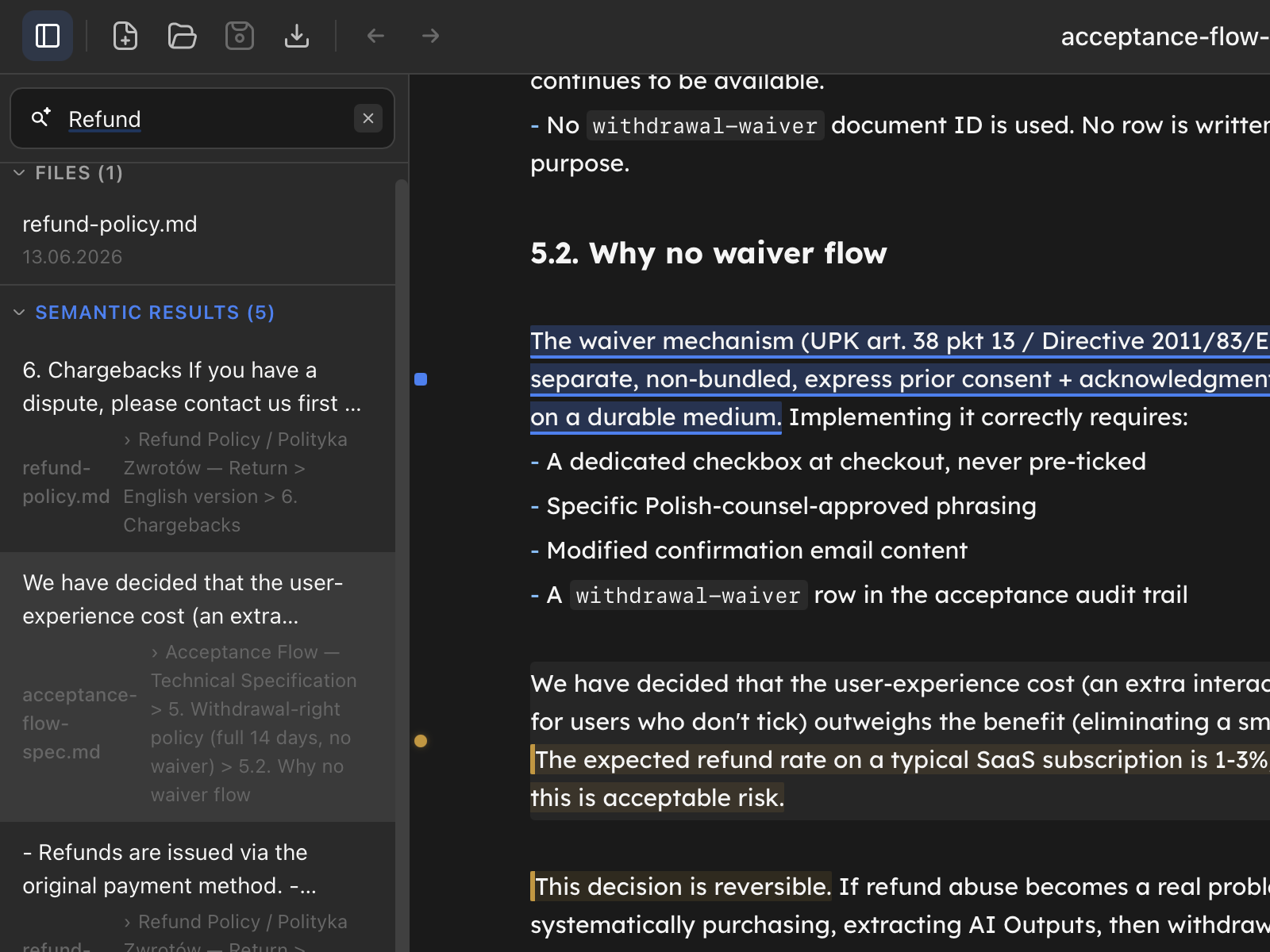
In text mode, results appear in the order they’re found, each with its file name and line number. Click to jump to the line.
In both modes, a separate Files section lists file-name matches - and it covers every file you can see in the Explorer, not just markdown.
What gets indexed
Only your markdown documents (.md files) are indexed for semantic search. Configuration files, templates, and other non-document files in the .config folder are excluded.
The search index is stored locally in Return’s database alongside your files. If you delete the database, the index rebuilds automatically from your files on next launch. Your files are always the source of truth.
How indexing changes your files
When you enable semantic search for a folder, Return adds a small metadata block to the top of each markdown file. This block holds a stable identifier and a few timestamps - it’s what lets chat history, annotations, and renames stay connected to the right document even if you move or rename files later.
The metadata block looks like this:
---
id: doc_a1b2c3d4e5f6
created: 2026-05-13T10:00:00Z
modified: 2026-05-13T10:00:00Z
---
Files in folders without semantic search remain untouched. Return adds metadata to a file only when:
- you enable semantic search for the folder containing it, or
- you use the file in a way that needs a stable anchor - sending a chat message about it, running a Return (Quick Action), creating an annotation or traffic light, editing its details in the side panel, accepting AI-suggested edits, or saving changes you made in the editor
Until then, opening a file just to read it never modifies the file on disk. Behind the scenes Return assigns the file a temporary identifier in memory so chat, annotations, and other tools all “see” the same document, but nothing is written to your file until you actually do one of the actions above. If you close the file without acting, the temporary identifier is discarded.
If you turn semantic search off later, the metadata stays in place - re-enabling later then skips files that already have it and only adds it to new ones.
Privacy
All search processing happens on your machine:
- Text search - direct scanning of your files on disk
- Semantic search - embedding model runs locally via the built-in engine
- No data leaves your computer - search works fully offline
Enabling semantic search does not send your documents to any server. The embedding model downloads once (under 500 MB) and runs entirely on your hardware.
Tips for better results
- Exact terms like “contract” or a party’s name work best in text mode - fast, literal, predictable
- Questions and phrases like “what are the penalty clauses” or “conditions for early termination” are what semantic mode is for - switch with the sparkle and describe what you mean
- Semantic search handles multiple languages - searching in one language can surface documents written in another when the meaning overlaps
- Editing a document automatically updates the semantic index within seconds